Notepad - Notebook and Notes
- 4.6
- Rating
- 100.00K
- Installs
- Free
- Price
 Analysis by App-foxy
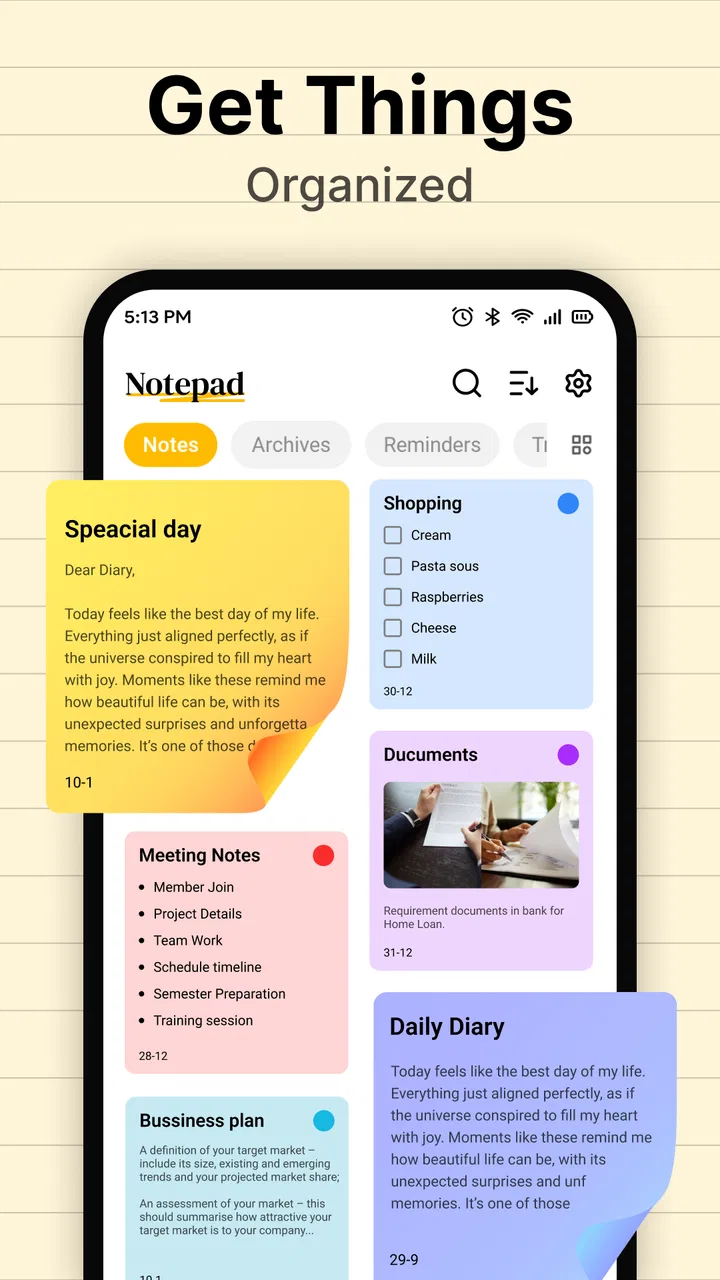
I use a notepad app for the small pieces of information that do not deserve a full project system: a shopping reminder, a phone number, a rough idea, or a short checklist before leaving home. Notepad - Notebook and Notes fits that simple role well. It is a free productivity app from Origin Infotech Apps, aimed at notes, checklists, task lists, and quick memos rather than complicated planning.
My first impression is that its value comes from staying focused. You open it because you want to write something down, not because you want to configure a workspace. That makes it easier to recommend to someone who finds larger note-taking platforms distracting. At the same time, the simplicity means it is not automatically the best replacement for a full document editor, cloud notebook, or team task manager.
How the app feels during everyday use
I judge a simple notepad by whether it helps me capture a thought without turning that moment into a project. Here, the everyday appeal is the short route from an idea to a written note, while the useful next step is deciding which notes should stay temporary and which deserve a more durable home. That distinction makes the app easier to use with confidence.
You May Also Like

 Blood Strike: 2.5 Anniversary
Blood Strike’s Loadouts Turn Every Drop Into a Tactical Gamble
A close look at Blood Strike’s custom loadouts: how fast access to signature weapons reshapes its battle royale rhythm, rewards preparation, and narrows the gap between fights.

 Pandora - Music & Podcasts
Pandora’s Music Is Easy to Start, but Harder to Recover
Pandora’s strength is its low-effort path from a seed to a station. Its weak spot is how much confidence it asks you to place in connection, setup, and quiet recovery.

 8 Ball Pool
 Is Built on Rivalries, Rematches, and Routine
A close look at the rivalries, rematches, shared routines, and unanswered safety questions that turn a quick pool match into a persistent mobile community.

 Samsung Music
’s Quiet Strength Is Playing What You Already Own
Its reach comes less from spectacle than from dependable access to a personal library. That simplicity is both the app’s strongest retention engine and its ceiling.

 AccuWeather: Weather Radar
AccuWeather Review: A Quick, Clear Forecast for Everyday Decisions
For everyday plans, the best forecast is the one you can understand quickly. AccuWeather makes rain timing, radar, and local conditions easy to act on, with a few trade-offs.

 Hill Climb Racing
Why Hill Climb Racing Still Turns Crashes Into One More Run
A tiny car, a bumpy hill and one more upgrade: Hill Climb Racing keeps resurfacing because its simple chaos makes every near-miss feel personal.
More From Our News Desk
View All News


Quick notes should feel quick
A basic notepad succeeds or fails on the time between opening the app and recording the thought. This app is designed around that short path. Its store summary describes it as a mobile notepad for notes, checklists, task lists, and memos, and that narrow purpose sets a reasonable expectation: you are choosing it for direct writing rather than a large collection of advanced tools.
In practice, I would use it for things such as a temporary packing list, a reminder for an appointment, ingredients for dinner, or ideas that I want to capture before they disappear. These are tasks where speed matters more than formatting. The less time I spend deciding which workspace or template to use, the more useful the app becomes.
There is also a practical difference between perceived speed and raw performance. A note app can feel fast because its interface is uncomplicated, even when the phone itself is busy. Notepad - Notebook and Notes benefits from that modest scope. I would not expect the same visual or organizational overhead associated with a feature-heavy notebook, which makes it a sensible choice for short, frequent entries.
A realistic routine: shopping, errands, and follow-through
Imagine I am leaving work and need to stop at a supermarket. I can create a short list with milk, vegetables, batteries, and detergent, then mark items as I find them. The useful part is not merely having text on screen; it is separating a list from a paragraph of reminders. For errands, that small distinction reduces the chance of overlooking something buried in a sentence.
The same approach works for preparing a weekend trip. I might keep one checklist for clothes, another for documents, and a short memo with the address or travel details. Once the trip is over, those notes can be cleared or repurposed. This is a better fit than a large project-management app when the task has a clear beginning and end.
One tip I found useful is to write the action first and the detail second. “Call the dentist — ask about the next appointment” is easier to scan than a long paragraph about the appointment. The app does not need to provide sophisticated organization for this workflow to work; the structure comes from how I write.
Where heavier use starts to expose the trade-off
The simplicity that helps with a quick memo can become limiting when the number of notes grows. If I were storing research, long personal journals, meeting records, and several ongoing projects together, I would want stronger ways to connect and retrieve information. A lightweight notepad is comfortable for isolated pieces of text, but it may require more discipline from me once the collection becomes large.
That does not make the app unreliable. It means the workload matters. A handful of short notes is a natural fit. A large archive that needs rich search, cross-linking, shared editing, or carefully structured folders belongs more naturally in a full notebook platform. I would choose this app for capture and simple lists, not as the only system for a complex work life.
Stability and the importance of recovery habits
For a notes app, reliability is more than opening without delay. The important question is whether I can trust a saved reminder when I need it later. My advice is to treat short notes as short notes and avoid using a simple mobile notepad as the sole home for irreplaceable writing. For anything important, I would keep a separate copy or move the finished material into a service designed for long-term storage.
This is not a criticism unique to this app. It is a sensible habit with any small utility whose main job is local, immediate capture. I also prefer saving a note before switching to another task, especially when I have written something important. That extra moment is a useful recovery habit because phones can close apps, lose power, or interrupt a session for reasons unrelated to the app itself.
For everyday reminders, this cautious approach is easy. A grocery list can be recreated. A carefully written set of work instructions cannot. The app is most trustworthy when I match the importance of the content to the simplicity of the tool.
Using it on older or modest devices
The minimum operating-system requirement is Android 8.0, so the app is not aimed at every very old Android phone. Within that boundary, its straightforward purpose should make it a reasonable candidate for users who want a basic writing tool without turning their device into a productivity dashboard.
I would still keep expectations realistic. A simple notepad may be less demanding than an app that constantly handles large documents, media, collaboration, and synchronization, but that does not guarantee identical behavior on every phone. Available storage, background activity, and the age of the device can all affect how any app feels.
For someone using an older compatible phone, I would start with small notes and check how comfortable the keyboard and screen are. The operating-system requirement tells me whether installation is possible; it does not tell me whether a particular device will be pleasant for long writing sessions. A compact memo tool is usually more convincing for brief entries than for drafting a long manuscript on a small screen.
What the current release tells me
The current version is 1.4, and the app was released on December 11, 2025. Those details place it in a relatively early stage compared with long-established note platforms. I would see that as a reason to keep my expectations measured rather than as an automatic warning.
An early-stage utility can be appealing precisely because it avoids years of accumulated complexity. It can also mean that I should not assume it will cover every advanced workflow I have seen elsewhere. If my needs are basic today, that may not matter. If I need a mature ecosystem with a long history of specialized tools, I would compare alternatives before moving all my important notes.
How it compares with familiar alternatives
Compared with a paper notebook, the app is easier to carry and more convenient for checklists because I can update an item instead of crossing it out. Compared with a general notes application that mixes documents, images, voice recordings, and collaboration, it is more focused. That focus is useful when I want a clean place for a memo, but it may feel restrictive when my notes depend on several kinds of content.
Compared with a task manager, it is better suited to flexible writing than to a schedule built around deadlines, recurring actions, reminders, and project status. I would not use it as a substitute for a serious work-planning system simply because a task list can be written inside it. Written tasks and managed tasks are not always the same thing.
Compared with a full notebook service, the main question is whether I value simplicity or a richer information structure. If I routinely need notebooks within notebooks, shared pages, detailed formatting, or a dependable archive across devices, another option is likely better. If I want a small digital pad for quick text and checklists, this app avoids much of the clutter that can make larger tools feel slow to use, even when their technical performance is fine.
Who will get the most from it
I think this app is a good match for students who need quick revision points, shoppers who want editable lists, families sharing simple household reminders on one phone, and anyone who wants a basic place for temporary thoughts. It also suits people who do not want to learn a complicated system before writing a two-line memo.
It may be particularly comfortable for users who think in short bursts. I can capture an idea, turn a group of errands into a checklist, and return to the app later without maintaining a large organizational framework. That is a real strength, not a missing feature disguised as praise: some people genuinely need less structure.
I would skip it as my primary tool if I manage multiple projects, depend on collaboration, keep extensive reference material, or need a polished long-form writing environment. I would also hesitate to place sensitive or irreplaceable information in any simple notepad without a backup routine. In those cases, the convenience of a lightweight app does not outweigh the need for stronger organization and recovery options.
Small workflow choices that improve the experience
One useful habit is to keep temporary and lasting notes separate in my own routine. I use quick entries for things that will be acted on soon, then rewrite important information into a more permanent system. This prevents the app from becoming an unsearchable pile of old reminders and makes it easier to trust what remains.
Another is to make checklists outcome-based. Instead of writing “trip,” I would use “pack charger,” “confirm address,” and “take identification.” Each line should represent something I can finish. This approach makes the checklist useful even if the app itself stays deliberately simple.
A third tip is to avoid turning one note into an entire life log. A short memo with a clear purpose is easier to revisit than a single endless page containing shopping items, work thoughts, and personal reminders. When I give each note a specific job, the app feels more organized without needing elaborate features.
These habits also reveal the central trade-off. The app gives me a low-friction surface, but I provide the organization. That is excellent for people who like controlling their own structure and less appealing for anyone who expects the software to automatically sort, connect, remind, and archive everything.
Value, audience, and expectations
Notepad - Notebook and Notes is free, which lowers the barrier to trying it for a simple productivity need. It is listed for Everyone, so its intended use is broad rather than aimed at a specialist audience. The app has an average rating of 4.6 from around 1.7 thousand ratings, with over 100 thousand installs, suggesting that its straightforward approach has found an audience.
Those figures do not change my practical judgment: popularity cannot turn a basic notepad into a project-management suite. They do, however, make it easier to recommend as a low-risk starting point for someone who wants to test a simple notes workflow without paying first.
My performance verdict
After looking at the way the app is positioned and the kind of work it is meant to handle, I see Notepad - Notebook and Notes as a focused utility rather than an all-purpose productivity center. Its perceived speed should be strongest during short writing sessions, its resource demands should be more modest than those of feature-heavy notebook tools, and its reliability depends partly on sensible saving and backup habits.
The best reason to install it is clarity: when I need a memo, checklist, or short task list, I can use a tool built around that exact moment. The main limitation is equally clear: once my notes become a large, important, or collaborative information system, I would move to a more capable alternative.
For a friend who wants a free, uncomplicated digital notepad on a compatible Android phone, I would recommend giving it a try. I would explain that it is strongest for quick capture and everyday lists, not for replacing every other productivity app. Used within those boundaries, it offers a sensible balance of speed expectations, simplicity, and practical usefulness.
FAQs for Notepad - Notebook and Notes
01What features does Notepad - Notebook and Notes offer?
Notepad - Notebook and Notes provides a user-friendly interface for creating and organizing notes. It includes features such as text formatting, checklist creation, and the ability to categorize notes into folders. Additionally, it supports cloud sync to ensure your notes are accessible across multiple devices, making it a versatile tool for both personal and professional use.
02Is Notepad - Notebook and Notes available offline?
Yes, Notepad - Notebook and Notes can be used offline. This is particularly useful for users who need to access their notes without an internet connection. However, to sync notes across devices, an internet connection will be required to ensure all changes are updated in the cloud storage.
03How secure is my data in Notepad - Notebook and Notes?
The app prioritizes user security by offering encryption for notes and secure cloud storage options. Users can also set up a password or biometric authentication to protect access to the app. These features help ensure that sensitive information remains confidential and protected from unauthorized access.
04Can I share notes with others using Notepad - Notebook and Notes?
Yes, sharing notes is easy with Notepad - Notebook and Notes. You can share notes via email or other messaging apps directly from the app. This feature is perfect for collaboration, allowing users to easily distribute important information and updates to colleagues, friends, or family members.
05Are there any customization options available in Notepad - Notebook and Notes?
Absolutely. Users can customize the app’s appearance by choosing from different themes and font styles, making it easier to personalize the experience. Additionally, users can organize notes with tags and colors, enabling quick access and improved organization tailored to individual preferences.
Pros
- User-friendly interface for quick note-taking.
- Supports rich text formatting options.
- Cloud sync for access across devices.
- Organize notes with tags and folders.
- Offline access to notes available.
Cons
- Lacks collaboration features for shared notes.
- No voice note integration options.
- Limited export formats for notes.
- Ads can be intrusive in free version.
- No dark mode for night-time use.

Notepad - Notebook and Notes
Gallery